The best dash cam under 200 dollars gives you strong HD recording, useful features, and solid build without breaking the bank. Our team compares top-rated models in the $100–$200 range so you can choose with confidence.
At a glance: In the under-$200 tier you can get dual lens, WiFi, GPS, 1080p or 2K video, night vision, G-sensor, and loop recording. This guide covers top picks (e.g. KDLINKS X1, WheelWitness HD PRO), what to look for, installation tips, and a 10-question FAQ.
If you’re looking for the best dash cam under 200 dollars, then you found help!
Look, we know you have a lot invested in your ride…
That’s why you want the extra protection you get from recording every mile you drive in HD 1080P video.
All the cameras in the $50–$100 price range you’ve looked at are nice, but you want something better with more bling.
We also think by now you’ve already read bunches of reviews and have your list of choices narrowed down to a few cameras with the best features and top ratings, right?
Based on our research, the best dash cam under 200 with strong hi-tech features is the KDLINKS X1, in part because of the custom Google Maps tracking software you can load on your phone.
But you might also like the WheelWitness HD PRO better because it can record in 2K HD video quality.
These two dash cams are great buys. If you’re still undecided after you compare them, we’ve built a list of 20 cameras for you to choose from—good, better, and best.
Your wheels, tires, exhaust and sound system are all top end—so why skimp on your dash cam setup? High-end gear does so much more.
 Play Back Those Close Calls
 Play Back Those Close Calls
Look, we get it. It’s not just about feeling safe. There’s more.
We know recording long road adventures is also why you want a dash cam.
How amazing would it be to have videos of those trips that had close calls—or that time you smoked the guy in the Vette?
You’ve shared these stories a thousand times with friends and family; now you can show them what happened and even upload to YouTube or start a vlog.
Even upload your videos to YouTube and let the world see. Maybe start a vlog?
Are these some of the quality features you’ve been reading about?
 Dual Lens (Capture videos from the front and back)
- WiFi & GPS (Automatically sync and log your location in the video while it records)
- Full HD 1080P (Record high-quality videos of your adventures)
- Auto Lock Detection (Perfect for accident detection)
- Motion Detection (Turns on the camera when your car is parked and records)
- Infrared Night Vision (Allows your camera to record when you drive in low light)
- Looping Recording (Automatically overwrites old files with new videos)
- G-Sensor (Gravity sensor senses impacts and keeps recording)
- Wide Dynamic Range (WDR) for a wider range of light in the frame
- Large Storage Capacity (Handles large and extra-large SD cards for longer recording)
- Superior Video Quality (Crisp HD for all your trips)
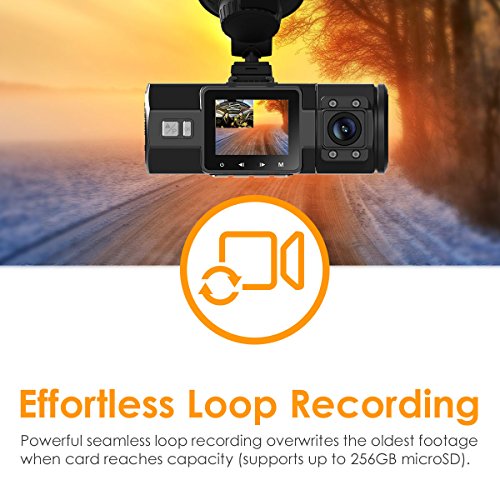
The dash cams listed below have many of these options and more, depending on the model you choose.


Important Installation Factors To Consider Before Buying a Dash Cam

For most dash cam models, installation is as easy as sticking the mount to your dashboard or windshield and clipping the camera on the mount.
Some kits include a hardwired power cable so you don’t need to use the accessory power jack; a few include rear-facing cameras that mount separately for rear recording.
Most cameras include software for downloading and watching videos on your phone. Before you decide, check what’s in the kit—you may want a different mount, power cable, or an extra high-endurance microSD card.
You shouldn’t have any problem with the installation—and if you need help, there are plenty of how-to videos on YouTube for most dash cam models.
If you prefer a pro install with wires hidden, many stereo shops now install dash cams too. It all starts with choosing: KDLINKS X1, WheelWitness HD PRO, or one of the other solid options below.


FAQ
1. What is the best dash cam under 200 dollars?
Strong options in this range include the KDLINKS X1 (with phone/Google Maps integration) and the WheelWitness HD PRO (2K video). Many dual-lens, WiFi, and 1080p/2K models sit under $200 with strong reviews.
2. Is a $200 dash cam worth it?
Yes. In the $100–$200 range you typically get better build quality, dual lens or 2K, WiFi/GPS, and reliable loop recording and G-sensor—worth it if you want solid evidence and fewer compromises than budget cams.
3. What features should I look for under $200?
Prioritize 1080p or 2K resolution, wide angle (140°+), loop recording, G-sensor, and night performance. WiFi, GPS, dual lens, and parking/motion detection are common in this tier.
4. Can I get a dual (front + rear) dash cam under $200?
Yes. Several models in our list offer front and rear recording under $200; check the product details for included cables and rear cam specs.
5. Do under-$200 dash cams have WiFi?
Many do. WiFi lets you view and download clips on your phone and adjust settings without removing the camera or card.
6. What storage card do I need?
Use a high-endurance microSD card (32GB–128GB) rated for continuous writing. Class 10 or UHS-I is typical; check the manufacturer’s max capacity.
7. How do I install a dash cam under $200?
Most use a windshield or dash mount and 12V power. Stick the mount, attach the camera, route the cable along the headliner/trim, and plug into the 12V outlet—or use an optional hardwire kit for a clean install.
8. Are there 4K dash cams under $200?
True 4K under $200 is rare; most are 1080p or 2K. For most users, 1080p or 2K is enough for clear license plates and evidence.
9. Where can I see dash cams under $50 or $100?
See our guides to the best dash cams under $50 and best dash cams under $100 for budget and mid-tier options.
10. How do I pick between good, better, and best under $200?
Good = solid single-channel 1080p. Better = dual lens or 2K, WiFi, or stronger night performance. Best = combination of 2K/dual, WiFi, GPS, and strong reviews—use our list and filters to compare.
More Alternatives
We’ve found the best dash cameras in every price range that work well with motorcycles, truckers, cars, and off-road vehicles.
- Check out the best dash cams Under $50 if you’re looking for a good budget value dash camera setup.
- Or, take a look at this list of the best dash cams under 100 dollars in the mid-tier for better gear.
Thank you for visiting Best Dash Cameras today. We hope you found the best dash cam for under 200 dollars that complements your taste in high-quality gear and matches well with your ride.